Version 0.5.1 ยท no account, no server

The start page
you lay out yourself.

Most browsers give you a grid of the sites you visited most. Lanes gives you a canvas instead. Build boards for the different parts of your life, split each one into vertical lanes, fill them with groups of links, notes, checklists and countdowns - then reach any of it from a keyboard-first launcher. It all lives in your own browser.

Nothing to install No sign-up Import your existing bookmarks

One board, four lanes, six item types. You decide how many of each, and what goes in them.

How it works

Four ideas, and you have the whole thing.

Lanes doesn't ask you to learn an app. It gives you four nested containers and gets out of the way.

1

Boards

Separate worlds - Work, Home, a client, a side project. Each board gets its own icon, accent colour, background and aliases. Ctrl+โ† โ†’ switches between them. Boards you're done with can be archived instead of deleted.

2

Lanes

Up to six independent vertical columns inside a board. Name them and they get a quiet label; leave a name blank and the lane simply carries none. Groups drag freely between lanes.

3

Groups

The cards that hold your items, of every type. Each one takes a colour, a description, its own density and a maximum height - so a group with sixty links scrolls inside its card instead of stretching the page. Pin one to keep it at the top of its lane.

4

Items

What actually goes in a group: shortcuts, collections, notes, todo lists, countdowns and separators. Mix them however the group needs.

Features

Built for people with a lot of links.

Every one of these is in the app today, in version 0.5.1.

A launcher, not a search box

Ctrl+K opens one field that searches links, groups, boards and actions. Narrow it with operators, or scope it to the current board instead of everything.

tag:work group:"Work example" collection:DTAP env:P

Your own !commands

Define a shortcut once and search any site straight from the launcher. {q} inserts the URL-encoded query, {raw} inserts it untouched.

gh = https://github.com/search?q={q}
!gh flaky test in CI

Four collection layouts

A collection holds many related links. Show it as an accordion, a compact list, an environment matrix, or a grid of icons.

AccordionListMatrixIcons

Three densities

Choose Comfortable, Compact or Dense globally, then override the setting per group or collection when one card needs to hold more.

Unlock and rearrange

Press E to unlock. Drag items, groups and boards, select several at once to move or delete them in bulk, and undo anything with Ctrl+Z.

Make it yours

Dark, light or follow the system. Fourteen background presets, or any image URL, colour or CSS gradient you like - globally, or overridden on a single board.

Bring your bookmarks

Export the HTML bookmark file from any browser and import it. Lanes shows you exactly what it found - and what looks broken - before it changes anything.

Reusable groups

Save any group as a template and drop it onto another board. Templates travel with your backups, and a single group can be exported as its own file to hand to a colleague.

Recover from weeks-old mistakes

Local version history keeps recent, daily and weekly snapshots inside the browser, so an accidental delete is a click away - not a rebuild.

Start from an example

An empty board is a hard place to begin. Add a ready-made example item to any group and adapt it to your own workflow - the demo links all point at example.com, so nothing you did not choose ends up on your board.

Layout

Six lanes, twelve colours, and a max height that saves your scrollbar.

The reason most start pages fall apart at forty links is that they only have one shape. Lanes gives you enough structure to stay readable at hundreds.
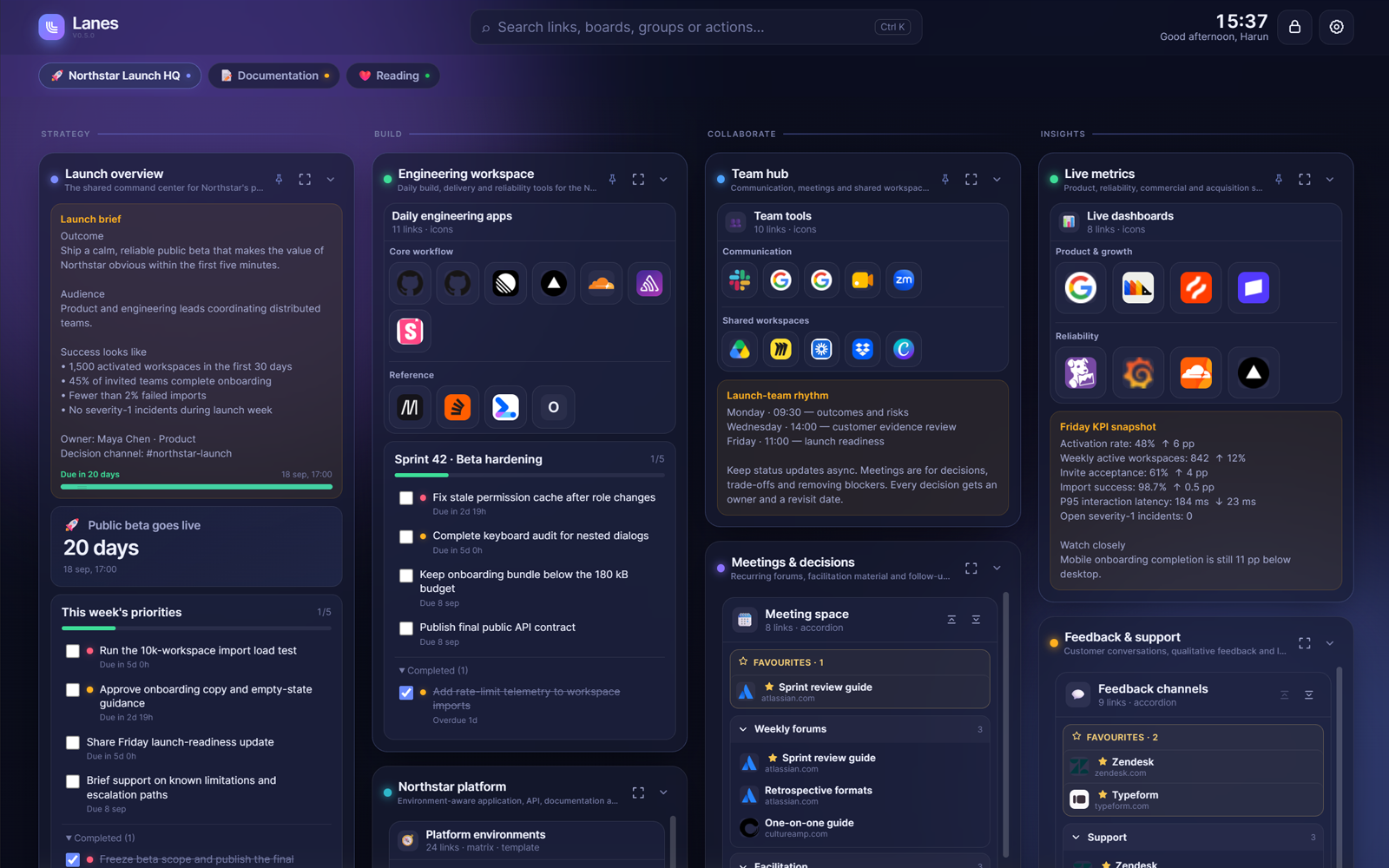
  • 1 to 6 vertical lanes per board, each an independent stack, named or invisible.
  • Twelve group accents so a board scans by colour before you read a word.
  • Capped group heights - fit content, or 320, 480 or 640 px with the overflow scrolling inside the card.
  • Pin, collapse and describe groups, and give each one a one-line subtitle for context.
  • Focus Mode dims everything except the group you're working in.
A Lanes board called Northstar Launch HQ, split into four named lanes: Strategy, Build, Collaborate and Insights. Between them sit a launch brief note, a countdown reading twenty days to public beta, priority checklists with due dates, grids of application icons and accordion collections.
Finding things

Stop hunting. Start typing.

One field covers every link you have saved, plus your groups, boards and the actions you can take. What it cannot find locally, it hands to the search engine you chose.

  • Favourites come first. Star a link inside a collection and it rises to the top of the launcher, from whichever board you happen to be on.
  • Every result shows its address - board, group, collection and section - so you always know what you are about to open.
  • Tags and aliases on every shortcut, group and board - so "gh", "git" and "GitHub" all land in the same place.
  • Operators - tag:, group:, collection: and env:, combinable.
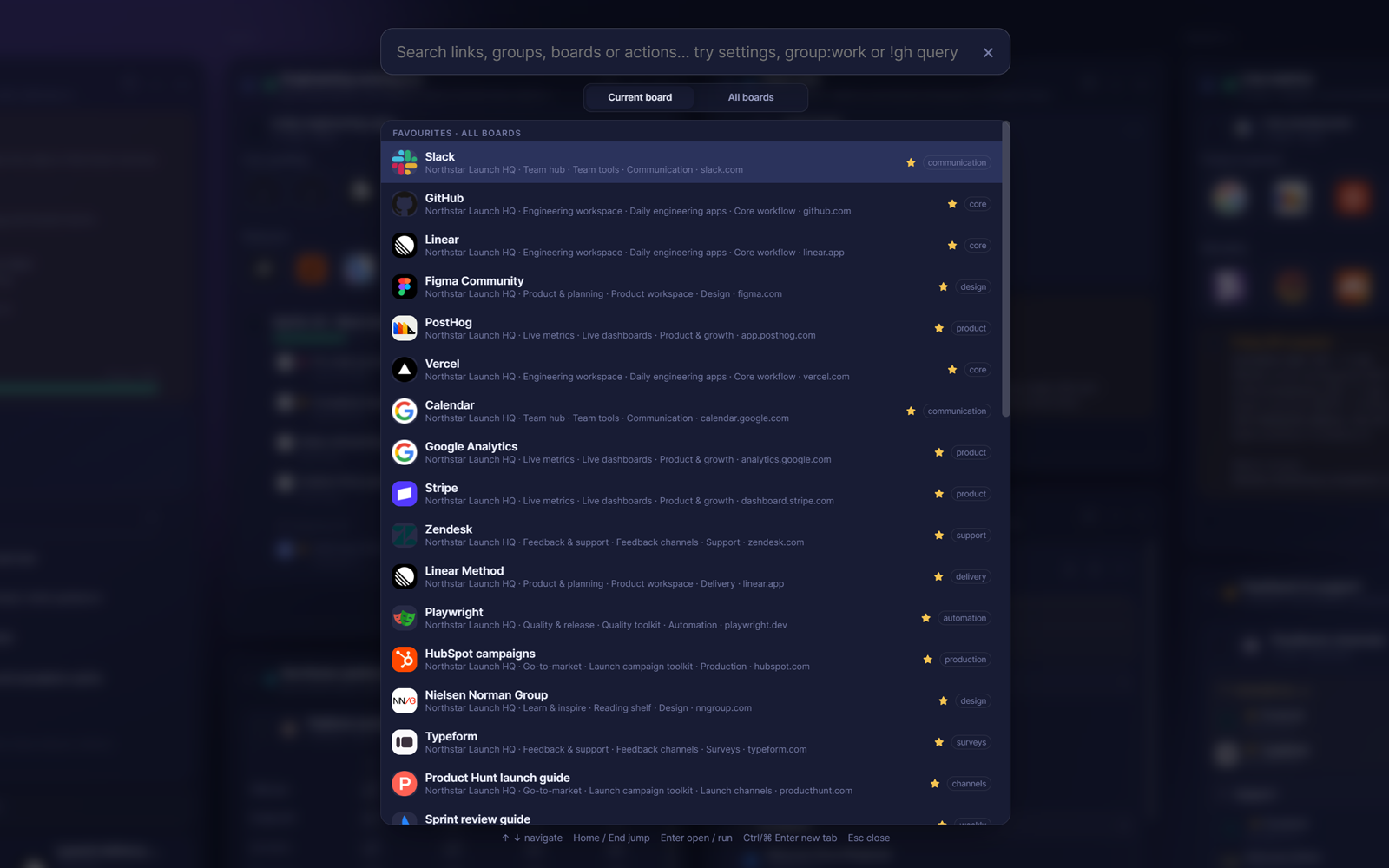
  • Actions are searchable too - type "settings" and open it, no menu required.
  • Six search engines to fall back on: Google, DuckDuckGo, Bing, Brave, Ecosia or Startpage.
  • Ctrl+Enter opens a result in a new tab without leaving the launcher.
The Lanes launcher open over a dimmed board, scoped to all boards. It lists starred favourites first, and every result shows its full path - board, group, collection and section - with its tag on the right. Along the bottom: arrows navigate, Enter opens, Ctrl+Enter opens in a new tab, Escape closes.
Collections

One row per service. One column per environment.

If your work involves the same handful of services across development, test, acceptance and production, you don't want twenty-four bookmarks. You want a grid. Describe the URL once and Lanes fills the rest in.

https://app-{env}.example.com
  • {env} and {label} expand to each environment's token and its display label.
  • Conditional separators - {-env}, {env-}, {.env} and {env.} vanish entirely when the token is empty, which is exactly what production usually needs.
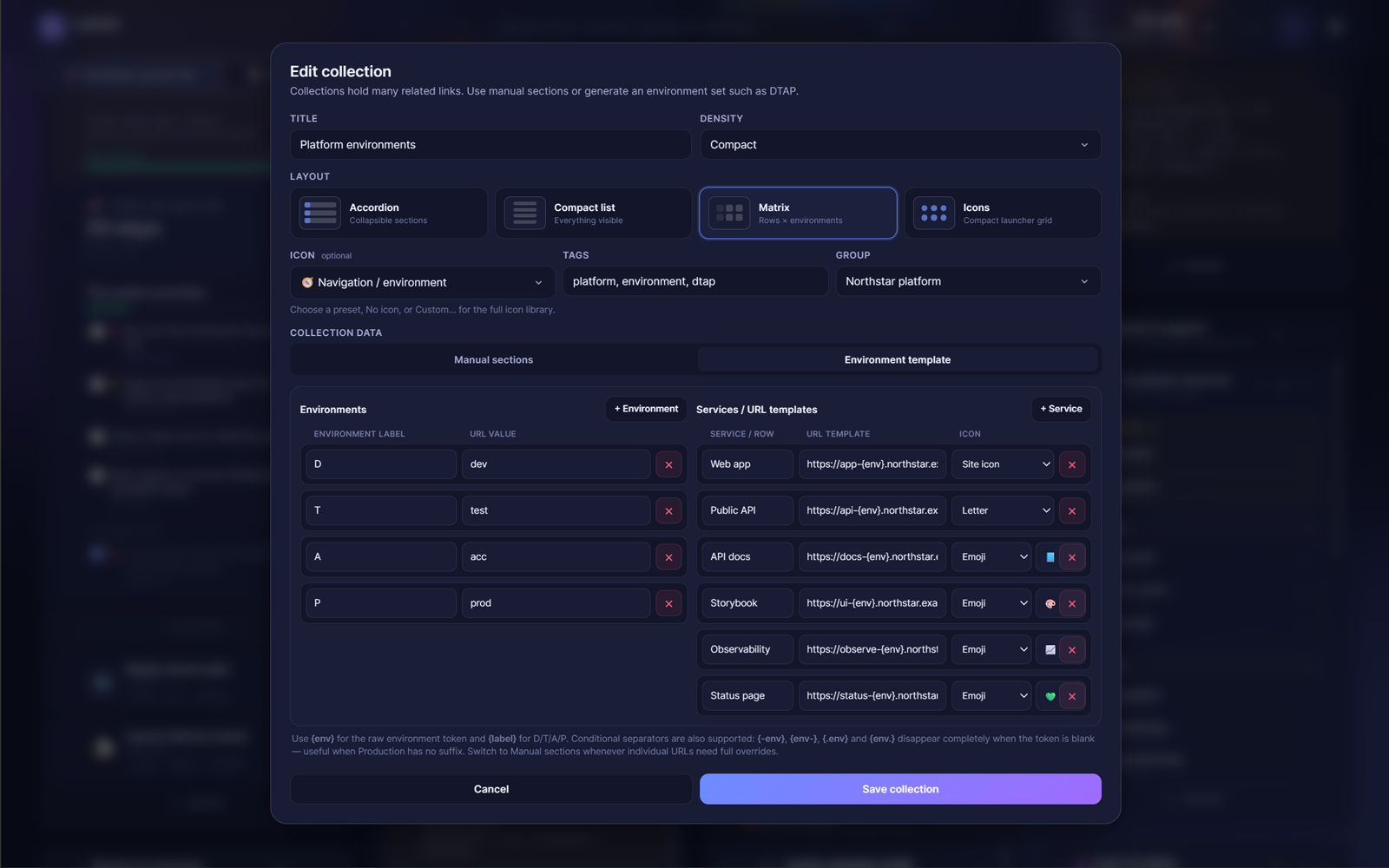
  • Any environments you like - the default D/T/A/P maps to dev, test, acc and prod, but the labels and tokens are yours.
  • Or skip the template and build manual sections by hand, dragging loose shortcuts in to nest them.
The Edit collection dialog in Lanes. The four layouts are offered side by side with Matrix selected, and below it an environment template maps the labels D, T, A and P to the tokens dev, test, acc and prod, next to URL templates for six services such as https://app-{env}.northstar.example.
Item types

Not everything on a start page is a link.

Six item types can live inside a group, in any order.

Shortcut

A single link with tags, aliases and an icon - the site's own favicon, an emoji, a letter, or nothing.

Collection

Many related links in sections, a list, a matrix or an icon grid. Drag a shortcut in to nest it.

Note

A short block of context. Give it a due date and it grows a progress bar that turns amber, then red.

Todo list

A checklist with priorities, due dates, optional links per task, and completed items tucked away.

Countdown

Days to a launch, a deadline, a trip. It sits on the board and quietly counts.

Separator

A labelled divider for when a group has two halves that shouldn't blur together.

Keyboard

The whole board, without the mouse.

Not just shortcuts - a real hierarchical navigation mode. Press K and you are moving through groups, collections and items with the arrow keys, with a heads-up display showing what each key does at the level you're on. Boards sit outside that hierarchy: Ctrl+โ† โ†’ switches between them whether or not you are in keyboard mode. ? opens the full list.

Global

  • Ctrl+KSearch and launcher
  • /Open search
  • Ctrl+โ† โ†’Previous or next board
  • EUnlock or lock the layout
  • N CNew shortcut or collection
  • G BNew group or board
  • Ctrl+ZUndo, while unlocked
  • ,Open settings

Board navigation

  • KStart or stop navigating
  • โ†‘โ†“โ†โ†’Move the highlight
  • Alt+โ†‘โ†“โ†โ†’Move the highlighted element
  • Shift+โ† โ†’Collapse or expand
  • EnterOpen, or go one level deeper
  • SpaceSelect, complete, or activate an Add control
  • FToggle Focus Mode
  • EscOne level back
Your data

There is no Lanes server holding your data.

Lanes is one HTML page running in your browser. Your boards are stored in that browser's local storage and nowhere else. That's the whole architecture - which is a real advantage and a real responsibility, so here are both sides of it.

What that means

  • No account. Nothing to sign up for, nothing to sign in to, no password to lose.
  • No analytics or tracking in the app. It doesn't phone home, because there's no home to phone.
  • Your links stay yours. Nobody - including us - can see what you've saved.
  • No sync. A second device starts empty. Move a JSON backup across to seed it.
  • Clearing your browser data clears Lanes. So does an IT policy that wipes site storage. Keep a backup.

What does leave your browser

Your boards never travel, but the page is not silent. Lanes makes exactly these outbound requests, and no others:

  • Site icons. Lanes asks each site for its own favicon.ico, then falls back to Google's and DuckDuckGo's public favicon services. Those requests reveal the domain being asked about. Set a shortcut's icon to an emoji, a letter or none to avoid them.
  • Searches you run go to the search engine you picked, as they would from the address bar.
  • A custom background loaded from an image URL is fetched from wherever you pointed it. The built-in presets are CSS gradients and touch the network not at all.
  • The links themselves, once you click them. Lanes never opens them on your behalf.

Four ways to not lose it

  • Local version history. Recent snapshots (up to 50), plus daily for up to 30 days and weekly for up to 12 weeks. Restoring takes a safety snapshot first.
  • Automatic folder backup. Real JSON files written to a folder you pick - including a network drive - after every change, hourly or daily. Needs Chrome or Edge on the desktop.
  • JSON export and restore. Download one file containing everything, or copy it straight to the clipboard.
  • Export the whole app. Download an HTML file with your layout baked in, or a clean copy to hand to someone else.

Lanes also tells you when it can't save - if browser storage is unavailable or full, a warning appears before you close the tab, rather than after.

Two ways to run it

Use it online, or keep the file.

Lanes is one self-contained HTML page. That is not a technical footnote - it means you can take the whole application with you and keep using it independently of this website.

Open it online

Always the current version, nothing to maintain. Set it as your browser's homepage and it is there every time you open a window.

  • Updates arrive on their own
  • Boards live in that address's browser storage
  • Works on desktop and phone
Open Lanes

Download the file

One HTML file, well under a megabyte. Put it on your disk, a USB stick or a shared drive and open it there. No install, no server, no connection needed to load it.

  • Yours to keep and to hand on
  • Runs from file://, an intranet or anywhere you host it
  • The same app, exported clean with no data in it
Download Lanes v0.5.1

Worth knowing before you download

A downloaded copy is a snapshot: it will not update itself, and browsers treat a local file as a separate origin, so its boards are stored apart from the online version - and some browsers restrict storage for local files altogether. If you want the same setup in both places, export a JSON backup from one and restore it in the other. For most people the hosted version is the easier choice; the download is there for offline machines, locked-down networks, and anyone who would rather not depend on a website staying up.

You can also export from inside the app at any time, under Settings โ†’ Data & sharing: a clean copy like this one, or a copy with your own boards already baked into it.

FAQ

The questions worth asking first.

Where exactly is my data stored?
In the local storage of the browser you're using, tied to the address Lanes is served from. It never travels to a server, which also means it doesn't follow you to another browser or another machine on its own. Use a JSON backup to move it.
What happens if I clear my browsing data?
Your boards go with it, and the same is true if your browser or your organisation's IT policy clears site storage. This is the honest trade-off of a no-server app. Turn on automatic folder backup, or export a JSON file now and then, and it stops being a risk.
Can I use Lanes on my laptop and my desktop?
Yes, but there's no automatic sync. Export a JSON backup on one machine and restore it on the other. If both machines can reach the same network drive, pointing automatic folder backup at it makes that a lot less manual.
Does it work offline?
Lanes is a single HTML file, so you can download it and open it straight from your disk. Your boards and the whole interface work; site icons won't load without a connection, and neither will the links themselves, obviously.
Which browsers does it need?
A current desktop or mobile browser. One feature is narrower than the rest: automatic folder backup uses the File System Access API, which today means Chrome or Edge on the desktop. The rest of the core app works in current major browsers.
Can I share a board with a colleague?
Not as a live shared board - there is no board-level export, and nothing syncs between people. You can, however, hand over the contents three ways: export a single group as a file, export a JSON backup of everything, or download a complete HTML copy of Lanes with your layout already inside it, which they open and it is just there. From then on their copy and yours are separate.
I have hundreds of bookmarks. Will importing them make a mess?
You get to look first. Import the HTML bookmark file your browser exports and Lanes shows a review screen - what it found, how it's structured, and anything that looks malformed - before a single thing changes. The check runs entirely on your machine; it doesn't contact any of the sites.
Is Lanes finished?
Lanes is at version 0.5.1 and actively being developed. The core experience is stable, but it is still an early release, so keeping a current backup is worth the minute it takes - which is exactly what the version history and folder backup are there for.
Feedback

Found a bug? Tell me about it.

Lanes is built by one person, and Lanes has no analytics - which means nothing is reported back automatically when something goes wrong. If you hit a bug, or you can think of a way it should work better, an email is the only way it reaches me. It genuinely helps.

mylanesapp@gmail.com

Bug reports, feature ideas and "why does it do that?" are all welcome.

Open a tab. Build the one you actually want.

Nothing to install, nothing to sign up for. Start with an empty board or import the bookmarks you already have.